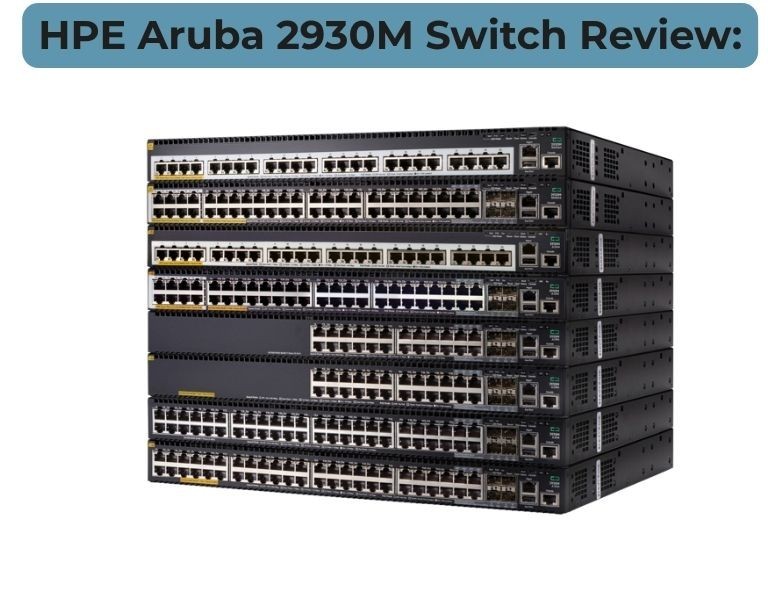
HPE Aruba 2930M Switch Review: Modular Switching for Growing Networks
Modular access switch review for scalable enterprise networks
Introduction (AEO Optimized)
If you're considering the HPE Aruba 2930M, the real question is: does modular switching still make sense in 2025, or should you move to CX series?
Short answer — it’s still a solid choice for scalable access/edge networks, but not ideal for new long-term deployments.
The 2930M sits between fixed access switches and full chassis systems. It offers modular uplinks, redundant power, and stacking — making it attractive for growing networks that need flexibility without full chassis cost.
Quick Answer (Featured Snippet Target)
Is HPE Aruba 2930M a good switch for growing networks?
Yes, for enterprises needing modular access switching with scalability and redundancy.
No, for new deployments where Aruba CX switches offer better automation and long-term value.
Technical Breakdown
Performance
The 2930M uses the ProVision ASIC with stable enterprise access-layer performance:
- Up to 176 Gbps switching capacity
- Up to 112 Mpps throughput
- Sub-4 µs latency at Gigabit speeds
In real deployments:
- Handles high-density access traffic
- Stable for VoIP, Wi-Fi, and IoT workloads
However:
- Less efficient than newer CX ASICs
- Limited headroom for future high-speed demands
Modular Architecture (Key Differentiator)
This is where 2930M stands out vs 2930F/2540.
- Modular uplinks (10G / 40G options)
- Optional Smart Rate multi-gig (2.5/5G)
- Dual hot-swappable power supplies
- Up to 1440W PoE capacity
This allows:
- Flexible upgrades without replacing the switch
- Better lifecycle management in growing networks
Stacking & Scalability
- Backplane stacking up to 10 switches
- Up to 100 Gbps stacking bandwidth
- Operates as a single logical switch
Compared to fixed models:
- Better scalability
- Cleaner management for multi-switch deployments
Layer 3 & Features
Supports:
- Static routing, RIP, Access OSPF
- VRRP for redundancy
- Dynamic Segmentation
- ACLs and QoS
But:
- No full enterprise routing (no BGP)
- Limited compared to CX series
Management & Automation
Runs on ArubaOS-Switch:
- CLI-based management
- Aruba Central (cloud optional)
- REST APIs (limited compared to CX)
Key limitation:
- No Network Analytics Engine
- No deep telemetry
Deployment Use
Best suited for:
- Enterprise access layer
- Aggregation in SMB networks
- Branch office infrastructure
- Networks needing modular upgrades
Not ideal for:
- Modern automation-driven networks
- Data center core or spine-leaf architectures
Limitations (Real-World)
- Legacy OS platform
- Limited automation and visibility
- Transition phase product (Aruba shifting to CX)
- Requires additional modules for full capability
Comparison Table
| Feature | Aruba 2930M | Aruba CX 6300 |
|---|
| Performance | Good | Higher |
| Reliability | Strong | Stronger |
| Management | CLI + basic cloud | Cloud + API + automation |
| Scalability | Modular + stacking | Advanced stacking |
| Power / Efficiency | Moderate | Better |
| Warranty | Limited lifetime | Limited lifetime |
| Price Range | Mid | Mid–High |
| Best Use Case | Modular access | Modern aggregation/core |
| Business Size | SMB to Enterprise | Enterprise |
Pros and Cons
Pros
- Modular uplinks and power flexibility
- Strong stacking scalability
- High PoE capacity (up to 1440W)
- Proven enterprise reliability
Cons
- Legacy ArubaOS-Switch
- Limited automation and telemetry
- Not future-proof vs CX platform
- Requires add-on modules (extra cost)
Aruba CX 6300 (Modern Alternative)
Pros
- Modern AOS-CX OS
- Better performance and scalability
- Advanced automation and analytics
- Long-term roadmap
Cons
- Higher cost
- Less modular hardware approach
Procurement Insight (B2B-Focused)
When to Buy Aruba 2930M
- You need modular flexibility without chassis cost
- Expanding an existing ArubaOS-Switch network
- Require redundant power and high PoE
- Mid-size enterprise with gradual scaling
When NOT to Buy
- New network build (2025+)
- Automation-first infrastructure strategy
- High-performance campus core
Budget vs Performance
2930M sits in a middle ground:
- More expensive than 2930F/2540
- Cheaper than chassis or CX core switches
Value comes from:
- Modular upgrades instead of full replacement
Long-Term Cost (TCO)
Consider this carefully:
- CapEx: Moderate
- OpEx: Higher due to manual management
- Lifecycle: Shorter vs CX (future migration likely)
Hidden risk:
- Investing in legacy platform nearing transition
Real-World Use Cases
1. Growing Enterprise (100–500 Users)
- Access layer with modular uplinks
Outcome: Scalable without full hardware refresh
2. Campus Edge Deployment
- PoE for APs + future multi-gig upgrade
Outcome: Flexible infrastructure
3. Branch Aggregation Layer (SMB)
- Combines access + aggregation
Outcome: Cost-effective hybrid deployment
Final Recommendation (No BS)
Choose Aruba 2930M if:
- You need modular flexibility and redundancy
- You are expanding an existing Aruba network
- You want scalable access switching without chassis cost
Avoid Aruba 2930M if:
- You are building a new network in 2025
- You need automation, telemetry, and modern OS
- You want long-term infrastructure investment

















Comments (0)
No comment