No products
To be determined Shipping
$0.00 Total

Blog Categories
Archives
Latest Posts

Learn when to replace an APC UPS battery, how to find the correct RBC cartridge, and how to replace it safely for reliable backup power.
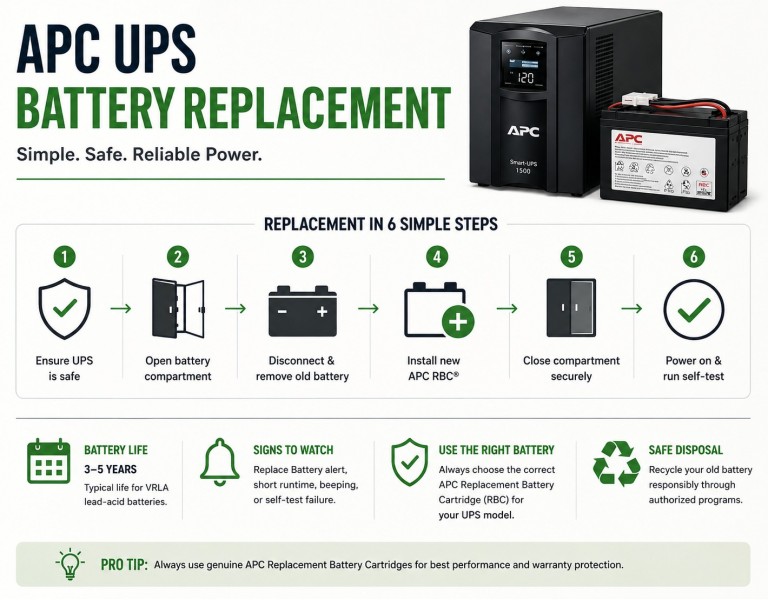
If your APC UPS is showing **“Replace Battery,” beeping more often, or providing much less runtime than it used to, the battery is usually the first thing to investigate. APC states that typical VRLA lead-acid UPS batteries have a service life of about 3–5 years, although temperature, load, and operating conditions can shorten that period.
The important part is choosing the correct APC Replacement Battery Cartridge (RBC) for your exact UPS model. APC uses many different battery cartridges, and the battery number from one UPS cannot safely be assumed to work in another.
This guide explains when replacement is necessary, how to identify the correct APC battery, what the replacement process involves, and when replacing the battery makes more sense than replacing the entire UPS.
For APC UPS systems using VRLA lead-acid batteries, the typical battery lifecycle is 3–5 years. APC also recommends proactive replacement because battery performance can deteriorate before the battery completely fails.
Actual battery life depends on several factors:
Heat is particularly important. A UPS operating continuously in a hot environment can experience shorter battery life than the same model operating in a cooler server room.
APC notes that load also affects runtime and recommends not exceeding 80% of the UPS rated capacity for normal operation.
You do not necessarily have to wait until the UPS stops providing backup power.
Common warning signs include:
Some Smart-UPS models also provide battery information through the UPS display and management interface.
If the UPS is several years old and runtime has dropped significantly, replacing the battery is often the appropriate first step rather than immediately replacing the entire UPS.
This is where many UPS owners make a mistake.
Do not choose an APC replacement battery simply because its voltage, Ah rating, or physical appearance looks similar.
APC provides a dedicated UPS Replacement Battery Cartridge Selector that uses the UPS model to identify the appropriate RBC.
APC UPS Replacement Battery Selector
The safest process is:
The UPS model number is more important than simply matching the old battery's specifications.
APC uses a wide range of replacement cartridges.
For example, RBC7 is a 24V, 17Ah VRLA replacement battery cartridge and is listed as compatible with the APC SMT1500C.
The SMT1500C is a 1440VA/1000W, 120V line-interactive Smart-UPS tower. APC lists RBC7 as its replacement battery.
Other APC battery cartridges have completely different electrical configurations. For example:
| APC Battery | Battery Configuration | Example Application |
|---|---|---|
| RBC7 | 24V, 17Ah VRLA | APC SMT1500C |
| APCRBC123 | 24V, 7Ah VRLA | Selected Back-UPS and Smart-UPS models |
| APCRBC124 | 24V, 9Ah VRLA | Selected Smart-UPS models |
| APCRBC140 | 192V, 5.1Ah VRLA | Selected high-capacity Smart-UPS systems |
These examples demonstrate why the UPS model should be used to determine the replacement battery rather than guessing from voltage or capacity alone.
Generally, no.
APC Replacement Battery Cartridges are designed to be replaced as complete assemblies. Schneider Electric specifically states that the individual batteries inside an APC replacement cartridge are not intended to be replaced separately.
A cartridge can contain multiple sealed lead-acid batteries along with wiring, fuses, temperature sensors, or other components depending on the model.
Replacing individual cells inside the cartridge can therefore create problems with:
For business-critical equipment, replacing the complete cartridge is the safer approach.
A common question is whether you should buy a genuine APC battery or use a cheaper replacement.
The decision depends on the application, but there is an important distinction between replacing a complete cartridge with a properly specified battery assembly and modifying an APC cartridge yourself.
APC states that genuine RBC cartridges are tested for compatibility with the UPS and are designed to restore the UPS to its original specifications.
Schneider Electric also states that modified or third-party replacement batteries can affect the manufacturer's warranty, Equipment Protection Policy, and product certifications.
For a UPS protecting servers, network equipment, storage, POS systems, or other business-critical equipment, using the manufacturer's specified replacement cartridge is generally the safer choice.
The exact procedure depends on the UPS model, so the user manual for your specific UPS should always take priority.
Many APC Smart-UPS models have user-accessible battery compartments. APC explains that user-replaceable batteries can be accessed through the battery compartment without opening the UPS enclosure.
A typical replacement process looks like this:
Some APC Smart-UPS models use hot-swappable battery modules, while others have different procedures. APC's documentation specifically notes that replacement procedures vary by model.
Do not open the main UPS enclosure just to replace the battery.
APC states that opening the enclosure can void the remaining warranty and that the UPS may contain dangerous high voltage. User-replaceable batteries are accessed through the designated battery compartment instead.
If the battery is not designed to be user-replaceable, follow the manufacturer's service procedure rather than improvising.
There is no single answer for every APC UPS.
Some Smart-UPS systems support hot-swappable battery replacement, while other models require different procedures.
For that reason, do not assume that every APC UPS can be opened and have its battery replaced while operating.
APC's replacement documentation and the UPS-specific manual should be followed for the exact model. APC also provides model-specific replacement instructions and videos for many Smart-UPS products.
Even with a hot-swappable design, connected equipment can temporarily lose battery protection while the battery is disconnected.
After installation, the UPS should be checked to make sure the new battery is recognized correctly.
Depending on the model, you may need to:
Smart-UPS systems can provide battery-related information and self-test functions, depending on the model.
If the UPS still reports a battery problem after installing the correct cartridge, do not immediately assume that the new battery is defective. The problem could involve the UPS charging system, battery connection, battery management system, or another hardware fault.
Usually, a healthy replacement battery should restore the UPS's battery performance closer to its expected operating condition, but runtime is not a fixed number.
Runtime depends on:
For example, a UPS supporting a lightly loaded network switch will generally provide substantially more runtime than the same UPS supporting a heavily loaded server.
Therefore, replacing the battery does not mean that every UPS will suddenly provide a specific number of minutes of runtime.
Battery replacement is not always the best investment.
Consider replacing the entire UPS when:
For a relatively modern Smart-UPS with a healthy UPS chassis, however, replacing the battery can be much more economical than replacing the complete system.
A 25-user office has an APC SMT1500C protecting networking equipment, a small server, and VoIP equipment.
The UPS is functioning normally but now provides only a few minutes of runtime and reports a battery warning.
In this situation, replacing the RBC7 is the logical first step because APC lists RBC7 as the replacement battery for the SMT1500C.
There is no reason to replace the entire UPS simply because its battery has reached the end of its service life.
A small server room has several Smart-UPS units that were installed around the same time.
One unit begins reporting a battery problem.
The IT administrator should check the installation dates of the other UPS batteries as well. If all batteries are approximately the same age and operating under similar conditions, the other units may also be approaching replacement time.
This is especially important for systems supporting critical infrastructure because replacing batteries proactively can reduce the chance of discovering multiple failed batteries during a power outage.
A larger Smart-UPS system uses multiple battery modules.
In this situation, battery replacement is more involved than simply removing one small cartridge. APC documentation for larger systems may require replacement of complete modules or groups of modules, depending on the UPS architecture. APC specifically recommends replacing all modules in certain high-capacity battery frames rather than mixing old and new modules.
Do not throw a used UPS battery into normal household or office trash.
APC provides recycling and disposal information with its replacement battery cartridges and supports APC-authorized recycling options in applicable markets.
The safest approach is to:
For most businesses, the decision is straightforward: if the UPS itself is healthy and only the battery has reached the end of its service life, replace the battery rather than the entire UPS.
The most important step is identifying the exact UPS model and correct APC RBC number. Do not choose a cartridge solely by matching voltage, Ah rating, connector, or physical size.
For example, the APC SMT1500C uses the RBC7 replacement battery, while other Smart-UPS models use completely different RBC cartridges.
For business-critical equipment, use the manufacturer's specified replacement cartridge and follow the model-specific installation instructions.
If the UPS is old, unsupported, or experiencing problems beyond the battery, replacing the complete UPS may be the better long-term decision.
APC UPS batteries are consumable components and typically need replacement after 3–5 years for VRLA models, depending on temperature, load, and operating conditions. The correct replacement battery depends on the exact UPS model, so use APC's battery selector or the UPS documentation instead of guessing from battery specifications. Replace the complete cartridge when required, follow the model-specific safety instructions, and recycle the old battery properly.
APC states that VRLA lead-acid batteries typically last 3–5 years, while lithium-ion UPS batteries typically have a longer lifecycle of approximately 8–10 years. Actual life depends on operating conditions.
Use the exact UPS model number with APC's Replacement Battery Cartridge Selector or check the UPS user manual. Do not rely only on the old battery's voltage or Ah rating.
APC recommends replacing the complete replacement battery cartridge rather than replacing individual batteries inside it.
For typical VRLA models, plan for replacement around every 3–5 years, while considering the UPS environment and actual battery condition.
If the UPS has a user-replaceable battery compartment or hot-swappable battery module, replacement may be performed by the user according to the model-specific instructions. Do not open the main UPS enclosure.
Yes. APC lists the RBC7 replacement battery for the SMT1500C.














Comments (0)
No comment