No products
To be determined Shipping
$0.00 Total

Blog Categories
Archives
Latest Posts

APC XS 1300 won't turn on and beeps when the button is held? Check the battery, breaker, overload, AC input, and possible UPS faults.
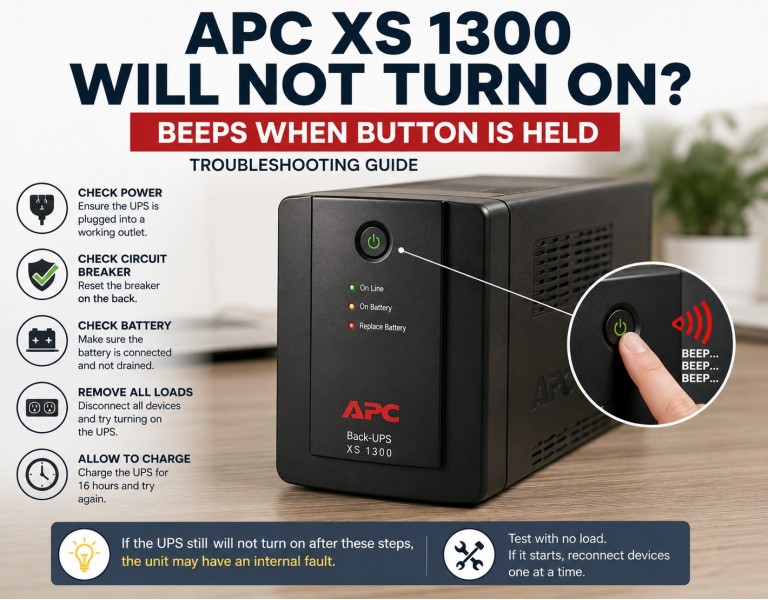
If your APC Back-UPS XS 1300 will not start and produces beeps while you hold the power button, the problem is commonly related to the battery, overload protection, input power, or the UPS's internal circuitry.
APC's own troubleshooting guidance lists several causes for an XS 1300 that will not turn on, including a disconnected battery, tripped circuit breaker, unsuitable utility voltage, or a battery that has reached the end of its useful life.
The exact beep pattern matters.
A normal XS-series UPS can beep when operating on battery, while continuous beeping can indicate a very low battery. APC also documents a continuous tone as an overload warning.
If the UPS only beeps while you hold the power button and never actually starts, work through the following checks.
Start with the simplest test.
Turn off all equipment connected to the UPS.
Disconnect everything from the battery-backup and surge-only outlets.
Unplug the UPS from the wall.
Wait several minutes.
Try starting the UPS again.
A connected device could have caused an overload or short condition. APC recommends removing non-essential equipment when troubleshooting an XS 1300 that will not turn on.
Look at the circuit breaker on the back of the XS 1300.
If it has popped out:
Disconnect the equipment from the UPS.
Push the breaker back in.
Try powering the UPS on again.
Reconnect equipment one device at a time.
If the breaker immediately trips again, one of the connected devices or the UPS itself may have a problem.
A disconnected battery can prevent the XS 1300 from operating correctly.
Unplug the UPS from the wall before accessing the battery compartment. Check that the battery connector is firmly connected.
APC specifically lists an internal battery that is not connected as one possible cause of an XS 1300 that will not turn on.
If the UPS has been sitting unused for a long time or recently ran until the battery was completely depleted, allow it to charge before testing it again.
Connect the UPS to a known-good wall outlet and leave it charging without a load.
APC recommends 16 hours of charging in its XS 1300 troubleshooting procedure when the battery has recently been discharged.
If the battery is old, however, charging may not bring it back to usable condition.
The battery is one of the first things I would investigate on an older XS 1300.
A worn-out battery can cause the UPS to fail its self-test or shut down when it attempts to start on battery power. APC lists a battery that has reached the end of its useful life as a possible cause of a no-power condition and recommends replacing it.
If the UPS is several years old and the battery has never been replaced, testing with a known-good replacement battery is a sensible next step.
After checking the battery and breaker, perform a no-load test.
Disconnect all equipment and connect the UPS to the wall. Then try starting it with nothing connected to its output.
If it starts normally with no load, reconnect your equipment one item at a time.
If it still refuses to start and continues producing the same beep behavior, the problem is less likely to be caused by your connected equipment.
The UPS also needs acceptable utility input.
Try a different known-good wall outlet and make sure the power cord is firmly connected.
APC lists utility input that is outside the UPS's acceptable range as another possible reason an XS 1300 will not turn on.
If you have:
Verified the wall outlet
Reset the rear breaker
Disconnected all equipment
Confirmed the battery is connected
Allowed the battery to charge
Tried starting the UPS with no load
…and the XS 1300 still only beeps and refuses to start, an internal UPS fault becomes increasingly likely.
APC documents several internal faults on its Back-UPS products, including charger, relay, temperature, fan, and other internal failures.
| Symptom | Most likely area to check |
|---|---|
| UPS completely dead | AC input, battery connection, breaker |
| Beeps but won't start | Battery, overload, internal fault |
| Starts with no equipment connected | Connected equipment/load |
| Breaker immediately trips | Overload or short |
| Old battery + startup failure | Battery replacement |
| Works after charging | Deeply discharged battery |
| Still fails with known-good battery | Possible UPS hardware fault |
For an APC XS 1300 that beeps when you hold the power button but never turns on, don't immediately replace the entire UPS. First disconnect the load, check the rear breaker and battery connection, test another wall outlet, and give a deeply discharged battery time to recharge. If the UPS still will not start with no load and a known-good battery, the UPS itself may have an internal fault.
The key distinction is whether the UPS can start without any equipment connected. That test can quickly separate a load/battery problem from a potentially failed UPS.














Comments (0)
No comment