No products
To be determined Shipping
$0.00 Total

Blog Categories
Archives
Latest Posts

Learn what to do if your hardware arrives damaged. Discover essential steps for documenting shipping damage, contacting sellers
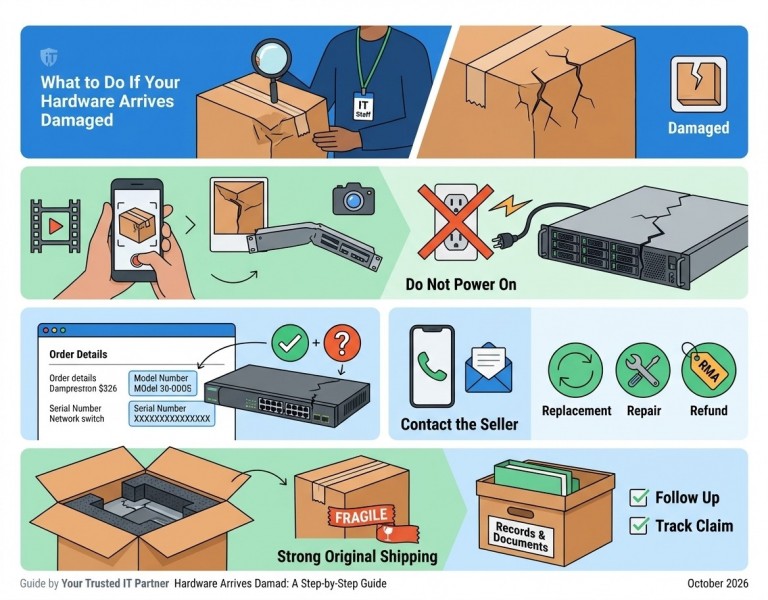
Ordering hardware online is convenient, whether you are purchasing servers, networking equipment, storage devices, computer components, or enterprise IT hardware. However, receiving damaged equipment can be frustrating, especially when you need it for an urgent business project or a critical IT infrastructure upgrade.
Shipping damage can happen for several reasons, including improper packaging, rough handling during transit, or accidental impacts during delivery. The good news is that taking the right steps immediately can help protect your purchase, simplify the return process, and reduce potential delays.
In this guide, we will explain what to do if your hardware arrives damaged and how to handle the situation professionally and efficiently.
The first step is to inspect the package as soon as it arrives.
Before signing for the delivery, carefully examine the external packaging for any visible signs of damage, including:
If you notice significant damage, take photographs before opening the package. If the delivery company allows it, note the visible damage on the delivery receipt.
Why this matters: Documenting the package's condition immediately can help support a shipping damage claim if you later discover that the hardware inside is also damaged.
Once you have received the package, document its condition before unpacking the equipment.
Take clear photographs or videos of:
If possible, record the unpacking process, especially when dealing with expensive enterprise hardware.
Keep all original packaging materials until the issue has been resolved. The seller or shipping carrier may request additional photographs or ask you to return the equipment in its original packaging.
Pro tip: Clear documentation can help the seller, manufacturer, or shipping carrier determine the nature of the damage and decide on the appropriate next steps.
It may be tempting to connect the hardware immediately to check whether it works. However, this is not always a good idea.
If the equipment has visible physical damage, loose internal components, bent connectors, liquid exposure, or signs of impact, avoid powering it on until it has been assessed.
For example:
For enterprise hardware, even minor physical damage can affect reliability or installation.
If the equipment appears damaged, contact the seller or manufacturer for guidance before attempting repairs or testing that could worsen the problem.
Not every hardware issue is caused by shipping damage. Sometimes, the problem involves incorrect specifications, missing accessories, or a defective component.
After documenting the equipment's condition, verify the following details:
Product model and part number: Make sure the received hardware matches your order.
Serial number: Record the serial number for warranty verification, return authorization, or support requests.
Physical condition: Look for dents, cracks, broken clips, damaged connectors, or other visible defects.
Included accessories: Check whether the package contains all the components listed in the product description or order confirmation.
Compatibility: For replacement components, confirm that the hardware matches the specifications of your existing system.
If the product appears physically undamaged but does not function correctly, record the symptoms and contact the seller. The issue may require technical troubleshooting rather than a shipping damage claim.
Once you identify the damage, contact the seller promptly.
Many sellers have specific deadlines and procedures for reporting damaged shipments. Waiting too long could complicate the claim or delay a replacement.
When contacting the seller, provide the following information:
Keep your communication clear, factual, and professional.
For example, you could write:
"Hello,
We received the hardware associated with our recent order, but unfortunately, the unit appears to have been damaged during shipping. We have documented the condition of the packaging and equipment and can provide photographs for review.
Please advise us on the next steps for arranging a replacement, repair, or return authorization.
Thank you for your assistance."
A detailed message helps the seller understand the issue and respond more efficiently.
After reviewing your claim, the seller may offer several possible solutions.
The appropriate option depends on the nature of the damage, the seller's policies, the manufacturer's warranty terms, and any applicable consumer protection laws.
A replacement may be appropriate when the equipment arrives damaged beyond practical use or cannot meet your requirements.
Before accepting a replacement, confirm the expected shipping time, replacement condition, and any additional costs.
For certain types of damage, an authorized repair may be possible. However, expensive enterprise hardware should be assessed by qualified technicians before any repair is attempted.
Depending on the circumstances and applicable policies, you may be eligible for a refund instead of a replacement or repair.
If the equipment is covered by a manufacturer warranty or support agreement, the manufacturer may be able to assist with diagnosis or service.
However, shipping damage is not necessarily covered by a standard manufacturer's warranty. Contact the seller and manufacturer to determine which process applies.
Before returning the product, obtain the seller's instructions and any required return merchandise authorization (RMA). Do not ship expensive equipment back without confirming the return procedure.
Original packaging is especially important when returning servers, networking equipment, storage devices, and other sensitive IT components.
Keep the following items until the claim is resolved:
Enterprise hardware can be heavy, delicate, or sensitive to electrostatic discharge. Using appropriate packaging helps protect the equipment during return shipping.
If the seller provides specific packaging instructions, follow them carefully.
After submitting your claim, maintain a record of all communications with the seller, manufacturer, and shipping carrier.
Keep track of:
If you do not receive an update within the expected timeframe, follow up with the responsible party.
For business customers, it may also be helpful to notify your IT team or project manager about the delay so that installation schedules and deployment plans can be adjusted accordingly.
When your replacement arrives, inspect it carefully before installing it in your system.
Repeat the same basic checks:
For enterprise equipment, verify compatibility with your existing infrastructure before deployment.
Depending on the hardware, this may include checking firmware versions, supported configurations, interface compatibility, and manufacturer documentation.
If you discover another issue, document it and contact the seller promptly.
Although shipping damage cannot always be avoided, a few precautions can reduce the risk.
Choose suppliers that provide clear product descriptions, transparent return policies, and responsive customer support.
For enterprise hardware, verify the exact part number, product condition, warranty details, and compatibility before placing an order.
Sensitive components should be packed using suitable protective materials. Servers, storage devices, network cards, and other electronic equipment may require anti-static protection and cushioning.
For high-value purchases, ask about shipping insurance, tracking, signature requirements, and the carrier's damage claim process.
Review the applicable terms before ordering.
Make package inspection part of your receiving process, particularly when accepting bulk shipments or expensive IT equipment.
Prompt inspection makes it easier to identify problems and report them within the applicable deadlines.
Record product details, serial numbers, purchase dates, and supplier information. These records can simplify troubleshooting, warranty verification, and return processing.
Photograph the packaging and equipment, avoid powering on potentially damaged hardware, retain the original packaging, and contact the seller promptly with your order details and supporting evidence.
In many cases, you can request a return, replacement, or other resolution. The available options depend on the seller's policy, the circumstances of the damage, and applicable laws.
Avoid powering on equipment with visible damage, liquid exposure, or potentially compromised electrical components. Contact the seller or a qualified technician for guidance before testing it.
Not necessarily. Manufacturer warranties often have specific exclusions, and shipping damage may need to be handled through the seller or shipping carrier. Review the applicable terms and contact the responsible party.
RMA stands for Return Merchandise Authorization. It is a reference issued by a seller or manufacturer to authorize and track the return of a product for inspection, repair, replacement, or refund.
The timeframe varies depending on product availability, the seller's investigation, shipping arrangements, and the return process. Contact the seller for an estimated resolution date.
Receiving damaged hardware can disrupt business operations, delay IT projects, and create unnecessary expenses. However, taking a systematic approach can make the process much easier.
Inspect the package immediately, document the damage, avoid using potentially unsafe equipment, contact the seller promptly, and follow the appropriate return or replacement procedure.
For businesses purchasing enterprise IT equipment, choosing a reliable supplier and verifying product specifications before ordering can also help reduce unnecessary complications.
The key is to act quickly, keep accurate records, and communicate clearly. These simple steps can help protect your investment and get your hardware replacement or resolution process moving in the right direction.














Comments (0)
No comment