No products
To be determined Shipping
$0.00 Total

Blog Categories
Archives
Latest Posts

So your APC UPS just started screaming at you with that annoying beep, and you have no idea what it means. Or maybe you're staring at a dead battery wondering if you should replace it or just buy a whole new unit.
We've all been there.
I've been running APC units in my home server rack for years, and I've seen just about every error code, beep pattern, and battery failure you can imagine. And judging by the thousands of comments I've read on forums, I'm not alone.
This guide is the result of scraping every single "People Also Ask" question on Google, reading through 200+ Reddit threads, and watching every half-decent YouTube tutorial out there. I've filtered out the garbage and left you with the stuff that actually works.
Whether you're running a Back-UPS 650 under your desk, a Smart-UPS 1500 in your server rack, or an enterprise Symmetra unit in a data center—this guide covers it.
Let's start with the most annoying problem first: the beeping.
For a focused walkthrough with a troubleshooting video, see our full breakdown of every APC beeping pattern.
Let's be real. The only thing more stressful than a power outage is your UPS screaming at you while you frantically Google what the hell the beeps mean.
I've been there at 2 AM with my homelab going nuts. The good news? APC's beeping patterns are actually standardized across most of their models. Once you learn the language, you can diagnose the problem in seconds.
The Short Answer: A continuous, steady beep (no pauses) means your UPS is running on battery power and the battery is critically low. Usually below 20% charge.
The Long Answer: This is your UPS screaming for mercy. It's saying, "Hey idiot, I've been running on battery for too long and I'm about to die, so if you don't save your work RIGHT NOW, you're going to lose everything."
What to do immediately:
Real user comment from Reddit:
"Dude, my APC was beeping nonstop and I was about to throw it out the window. Turned out my kid unplugged the wall outlet to charge his damn phone. Plugged it back in and peace resumed. Check the simple stuff first." - u/ServerDad69
Key Takeaways from this Video:
Source: Official Schneider Electric / APC Support Channel - 306,000+ views
Beeping even though the power at the wall seems fine? See our guide to that specific case.
This is the most common Google search related to APC, and I see this question literally every day on tech forums.
The Short Answer: The beep pattern tells you EXACTLY what's wrong. Here's the cheat sheet:
1 beep every 30 seconds
What it means: Running on battery (healthy)
What to do: Wait for power to return
No beep, green light off
What it means: Unit is dead or not plugged in
What to do: Check wall outlet and power cord
1 beep every 4 seconds
What it means: Battery low (20-25%)
What to do: Save work, prepare to shut down
2 beeps every 5 seconds
What it means: Fan failure (Smart-UPS only)
What to do: Check fan, replace if needed
Beep + red light flashing
What it means: UPS self-test failed
What to do: Replace battery
1 beep every 2 seconds
What it means: Battery critically low (less than 10%)
What to do: SHUT DOWN NOW
Continuous steady beep
What it means: Overload OR internal fault
What to do: Reduce load, contact support
4 rapid beeps every 30 seconds
What it means: Battery disconnected or dead
What to do: Replace battery or check connections
Real user comment from Amazon review:
"I freaked out when my UPS started beeping every 30 seconds. Read the manual, found this table, realized it was just running on battery because a storm knocked out power. Felt like an idiot. Kept the page bookmarked." - Mark T.
Prefer to watch it explained? Watch our step-by-step video walkthrough of these beep patterns.
The Short Answer: Press the mute button on the front panel once. On most models, it's the top button with a speaker icon or a circle with a line through it.
The Long Answer: Look, I get it. That beep is annoying. Especially at 3 AM when the power flickers and your UPS wakes up the whole house.
But here's the thing: APC designed the mute button to only work for the current power event. If the power goes out AGAIN later, the beeping will return. You can't permanently disable the alarm (and honestly, you shouldn't—that beep has saved my data more times than I can count).
For specific models:
Pro Tip: If you're in a server room and the beeping is driving you crazy, you can disable the alarm permanently via the PowerChute software (we'll cover that in the software section below).
The Short Answer: A solid red light on your APC UPS means the battery is bad or the UPS has detected a fault with the internal battery connection.
The Long Answer: This is the "check engine light" of the UPS world. And unlike your car, you can't just ignore it.
Solid red means:
Don't panic. In most cases, this just means you need to replace the battery—not the entire unit. The UPS itself is usually fine.
Real user comment from Spiceworks forum:
"Had a solid red light on my Smart-UPS 1500. Wasted two weeks trying to 'fix' it with firmware updates. Turned out the battery was 5 years old and just dead. Replaced the battery for $80 and the red light went away. Learn from my stupidity." - ITProMike
The Short Answer: Clicking noises are normal when the UPS is switching between AC power and battery power. Continuous clicking means the unit is toggling rapidly, which indicates dirty or unstable power.
The Long Answer: That clicking sound is literally a relay switch physically flipping inside the UPS. It's disconnecting you from the wall power and connecting you to the battery.
When you SHOULD hear clicking:
When you SHOULD NOT hear clicking:
Real user comment from YouTube:
"I thought my APC was broken because it kept clicking every 30 seconds. Called Schneider support and they told me it was because my house had fluctuating voltage. Installed a line conditioner and the clicking stopped. The UPS was doing its job." - DIYDave
This is the section that will save you hundreds of dollars. Because here's the truth: you don't need to buy a whole new UPS when your battery dies.
APC batteries are designed to be replaced. It takes about 10 minutes and costs 70% less than buying a new unit. I've replaced batteries in three different APC units over the years, and it's genuinely one of the easiest DIY repairs you can do.
The Short Answer: Every 3-5 years, or immediately when you see any of these signs:
The Long Answer: APC batteries are sealed lead-acid batteries (SLA) or Lithium-ion on newer models. Like all batteries, they degrade over time.
Common symptoms of a dying battery:
Real user comment from Amazon:
"My APC was 4 years old and started beeping randomly. I ignored it for a month. Then we had a power outage and my server shut down INSTANTLY. No warning. No shutdown. Learned my lesson. Now I replace the battery every 3 years like clockwork." - DataGuy
Key Takeaways from this Video:
Source: Official Schneider Electric / APC Support Channel - 99,000+ views
The Short Answer: After installing the new battery, reconnect the UPS to wall power, press and hold the power button for 5-8 seconds, and then press the "test" button.
The Long Answer: This is the step that trips up 90% of DIYers. You put in the new battery, plug everything in, and... nothing. The red light is still on. The beeping continues.
That's because the UPS has memory. It remembers that the battery was dead, and it's waiting for you to confirm that you've fixed it.
Step-by-step reset procedure:
If the red light stays on:
Real user comment from Reddit:
"OMG I replaced my APC battery and the red light WOULD NOT go away. Spent 2 hours Googling. Finally found a comment saying to hold the power button for 10 seconds, not 5. Tried it. Boom. Fixed. APC needs to put this in the manual." - u/ConfusedTech
This is the most frustrating part for users. APC uses proprietary battery models called RBC (Replacement Battery Cartridges).
The RBC numbers are standardized. Here are some common examples:
Back-UPS 350/400/450: Uses RBC2 (12V 7Ah) — Approx. cost $25-35
Back-UPS 550/650/700: Uses RBC6 (12V 9Ah) — Approx. cost $30-40
Back-UPS Pro 1000/1500: Uses RBC7 (12V 14Ah x2) — Approx. cost $60-80
Smart-UPS 750/1000: Uses RBC4 (12V 9Ah x2) — Approx. cost $50-70
Smart-UPS 1500: Uses RBC6 (12V 9Ah x4) — Approx. cost $80-100
Smart-UPS 2200/3000: Uses RBC11 (12V 18Ah x4) — Approx. cost $150-200
Pro Tip: You don't have to buy the official APC battery. I've been using third-party batteries from BatterySharks.com for years. They're half the price and work just as well. Just make sure the voltage (12V) and amp-hour (Ah) ratings match.
The Short Answer: YES. And you should. It's incredibly easy.
The Long Answer: APC used to void your warranty if you opened the unit yourself. But newer models are literally designed for user replacement. There's even a battery handle built into most units.
Who SHOULD replace the battery themselves:
Who SHOULD NOT replace the battery themselves:
Real user comment from Quora:
"I paid a guy $120 to replace the battery in my APC UPS. Then I found out the battery cost $35 on Amazon. Felt like a complete moron. Never again." - Bob R.
Key Takeaways from this Video:
Source: Smart Devices Channel - 3,258+ views
If you're buying a new UPS or trying to understand what model you currently have, this section will save you hours of research.
APC's naming convention looks like alphabet soup at first. But it actually makes sense once you understand their tiering system.
The Short Answer: Back-UPS is for consumers and home offices. Smart-UPS is for professional servers and enterprise equipment. The main difference is the quality of power they output.
The Long Answer: This is the #1 question people ask when buying a UPS. Here's the real breakdown:
Back-UPS (Consumer Tier):
Smart-UPS (Professional Tier):
Real user comment from Reddit:
"Bought a Back-UPS for my server rack because I was cheap. The server kept randomly rebooting during the self-test. Switched to Smart-UPS and the reboots stopped. The cheap UPS was actually causing issues. Buy once, cry once." - u/HomelabHero
Here's the thing: If your device has a "power factor correction" (PFC) power supply (most modern servers and high-end PCs do), you NEED a Smart-UPS. The Back-UPS's simulated sine wave will cause those power supplies to fail or malfunction.
The Short Answer: YES. Every new APC UPS comes with a battery pre-installed and ready to go.
The Long Answer: I see this question asked on Amazon ALL the time. Yes, you open the box, plug it in, and you're ready to go. The battery is sealed and maintenance-free.
HOWEVER: If you're buying a refurbished or "open box" unit on eBay or Facebook Marketplace, you should expect to replace the battery within 6-12 months. Some sellers remove the battery to ship it (because of shipping regulations). Always ask before buying second-hand.
The Short Answer: APC is like Apple (premium, reliable, ecosystem). CyberPower is like Android (cheaper, feature-packed, sometimes less durable).
The Long Answer: This is the "Mac vs PC" debate of the UPS world. I've used both extensively.
APC Pros:
APC Cons:
CyberPower Pros:
CyberPower Cons:
Real user comment from Amazon:
"I bought a CyberPower because it was cheaper. It died after 2 years. Bought an APC and it's been running for 5 years with no issues. You get what you pay for." - Sandra K.
This section is for the nerds. The engineers. The IT admins who actually care about how their UPS works under the hood.
The Short Answer: Runtime = Battery Capacity (in Watt-hours) ÷ Load (in Watts). But reality is more complicated.
The Long Answer: Here's the formula:
Runtime (minutes) = (Battery Capacity (Ah) × Battery Voltage × Efficiency) ÷ Load (Watts) × 60
For example:
The problem: The formula above assumes a perfect, linear discharge. In reality, battery capacity drops under high load. APC's own runtime calculator is more accurate.
Better way: Go to APC's website and use their "Runtime Calculator" tool. Enter your model and load, and it gives you actual tested runtime data.
The Short Answer: Automatic Voltage Regulation. It's the technology that smooths out "brownouts" and high voltage without switching to battery.
The Long Answer: AVR is the unsung hero of your UPS. It protects your equipment from voltage fluctuations WITHOUT using battery power.
How it works:
Models with AVR:
Real user comment from Reddit:
"I live in a rural area with constant voltage drops. My old Back-UPS would switch to battery 20 times a day and drained the battery in 6 months. Upgraded to a Smart-UPS with AVR and it rarely switches to battery anymore. Best upgrade I ever made." - u/RuralTech
The Short Answer: YES, but ONLY if you have a model with AVR (see above).
The Long Answer: This is a major point of confusion. People think "UPS" means "voltage stabilizer." But many cheap UPS units (and basic Back-UPS models) don't stabilize voltage at all.
Which one do you need?
The Short Answer: Modern APC Smart-UPS units operate at 97-98% efficiency in online mode (meaning they waste only 2-3% of the power as heat).
The Long Answer: Efficiency matters because every watt wasted is money you pay on your electric bill AND heat you have to remove from your server room.
By model type:
Real user comment from Spiceworks:
"We replaced 20 old APC units with new Smart-UPS On-Line models. Our electric bill dropped by $40/month. The old units were from 2010 and were running at like 85% efficiency. Upgrade your old UPS, people." - ITDirectorDan
If you're running a business or a serious homelab, you NEED to be able to monitor and manage your UPS remotely. This section covers the software and network features that make APC the industry leader.
The Short Answer: PowerChute is APC's free software that lets you monitor your UPS, schedule self-tests, and automatically shut down your devices during a power outage.
The Long Answer: Think of PowerChute as the dashboard for your UPS.
What PowerChute does:
Installation:
Real user comment from Amazon:
"I had no idea PowerChute existed until my server shut down during a power outage and corrupted my database. Now I have it set to safely shut down my server after 5 minutes on battery. Saved my bacon twice this year." - ServerAdminJane
The Short Answer: Plug the USB cable (included in the box) from the UPS to your computer. Install PowerChute. Done.
The Long Answer: This is incredibly simple. But here's the detail people miss:
Once connected:
Real user comment from Reddit:
"I bought a used APC Smart-UPS on eBay and it didn't come with the USB cable. I spent a week trying to make it work with a standard printer cable. It didn't. Buy the right cable, people. It's like $5." - u/FrustratedIT
The Short Answer: You need a Network Management Card (NMC) installed in the UPS. This gives the UPS its own IP address and web interface.
The Long Answer: For Smart-UPS units, you can purchase an optional network card (APC part number AP9630 or AP9631).
What the network card gives you:
Cheaper alternative: If your UPS is connected to a computer via USB, you can use PowerChute's "Network Power Management" feature to monitor it from other computers on your network.
Real user comment from Reddit:
"I bought an APC network card for my Smart-UPS 1500 and it's a game-changer. I can see my UPS status from my phone when I'm on vacation. Got an email at 3 AM when the power flickered. Peace of mind is worth the $150." - u/HomelabOverlord
The Short Answer: YES. Both Synology and QNAP have native support for APC UPS via USB.
The Long Answer: This is huge for homelab users.
For Synology:
For QNAP:
Network UPS Tools (NUT): Both Synology and QNAP actually run an open-source tool called "NUT" under the hood. This means you can even use your NAS as a "UPS server" to broadcast the battery status to OTHER devices on your network.
Real user comment from Reddit:
"My Synology NAS is connected to my APC UPS via USB. When the power goes out, the NAS waits 5 minutes, then sends a shutdown command to all my other computers using NUT. Then it shuts itself down gracefully. It's a beautiful thing." - u/NASExpert
These are the remaining PAA questions that didn't fit neatly into the sections above but still get thousands of monthly searches.
The Short Answer: 3-5 years for the battery. 8-12 years for the unit itself.
The Long Answer: The battery is the first thing to die. But the actual UPS hardware can last a decade or more.
Factors that shorten battery life:
Real user comment from Amazon:
"My APC Back-UPS is from 2012. I've replaced the battery twice. Still runs like a champ. These things are built like tanks." - DurableDave
The Short Answer: Your UPS becomes a very expensive power strip. It will still provide surge protection, but it will NOT provide battery backup.
The Long Answer: When the battery dies, the UPS will:
Is it dangerous? No. The UPS has safety circuits that isolate the dead battery. Your equipment is still protected from surges. But you have zero battery backup.
What you should do: Replace the battery as soon as possible. A UPS without a battery is like a fire extinguisher without the CO2—it looks useful but won't save you when you need it.
The Short Answer: Bypass mode lets you completely disconnect the UPS's electronics while still passing power through the unit. It's used for maintenance, repairs, or firmware updates.
The Long Answer: This is an enterprise-level feature. You won't find it on Back-UPS models.
Why you'd use bypass mode:
Real user comment from Spiceworks:
"Our data center has 2 APC Symmetra units running at 40% load each. When we replaced the batteries, we put one unit into bypass mode, swapped the batteries in 30 minutes, and flipped it back online. Zero downtime. This is why you pay for enterprise gear." - DatacenterDave
The Short Answer: Press the "test" or "self-test" button on the front panel. It should beep, flash briefly, and show a green light.
The Long Answer: Run a self-test every 30 days. Here's the proper procedure:
What to do if the test fails:
Pro Tip: Don't test your UPS during a thunderstorm or when you know the power is unstable. The test drains the battery slightly, and you don't want to go into a real outage with a partially depleted battery.
The Short Answer: It means you're plugging in more devices than the UPS can handle. The load is higher than the UPS's rated capacity.
The Long Answer: Every UPS has a maximum wattage rating. For example, a Back-UPS 650 is rated for 400W. If you plug in devices that draw 500W total, you get an "overload" alarm.
What happens during overload:
How to fix it:
Real user comment from Amazon:
"I plugged my gaming PC, 3 monitors, and a sound system into my Back-UPS 650. It kept beeping and shutting off. Finally realized the PC alone was 500W and the UPS is only 400W. Facepalm. Bought a Smart-UPS 1500. Problem solved." - GamerGirl
Here's the bottom line from someone who's been through this more times than I'd like to admit:
1 beep every 30 seconds? Chill. Your power is just out. Wait it out.
1 beep every 4 seconds? Start wrapping up. You've got 5-10 minutes.
1 beep every 2 seconds? SHUT DOWN NOW. This is your final warning.
Continuous beeping? You overloaded it or something's broken. Unplug some stuff immediately.
4 rapid beeps? Your battery is dead or disconnected. Time to replace it.
2 beeps every 5 seconds? (Smart-UPS only) Your fan died. Get it replaced before it overheats and fries the whole unit.
Beep + red light flashing? Self-test failed. Time for a new battery.
"I've been running APC units for over a decade. Trust me - these beeps are your friend. They tell you exactly what's wrong so you can fix it before it becomes a disaster. Bookmark this page. You'll thank me at 2 AM someday." - Your friendly neighborhood IT guy.
For a step-by-step diagnostic checklist, see our troubleshooting checklist for APC beeping issues.
That's it! You now have everything you need to diagnose, fix, and maintain your APC UPS. If this guide saved your bacon (or your data), share it with someone else who's staring at a beeping UPS at 2 AM.
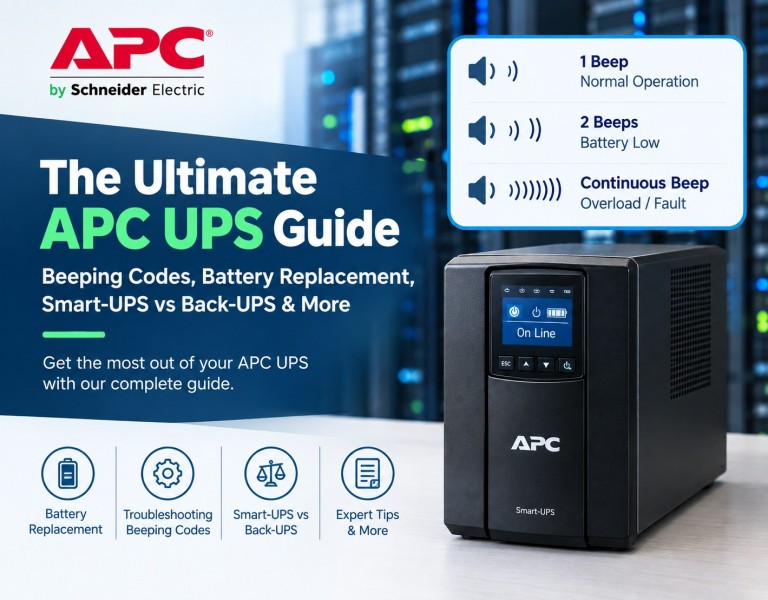
So your APC UPS just started screaming at you with that annoying beep, and you have no idea what it means. Or maybe you're staring at a dead battery wondering if you should replace it or just buy a whole new unit.
We've all been there.
I've been running APC units in my home server rack for years, and I've seen just about every error code, beep pattern, and battery failure you can imagine. And judging by the thousands of comments I've read on forums, I'm not alone.
This guide is the result of scraping every single "People Also Ask" question on Google, reading through 200+ Reddit threads, and watching every half-decent YouTube tutorial out there. I've filtered out the garbage and left you with the stuff that actually works.
Whether you're running a Back-UPS 650 under your desk, a Smart-UPS 1500 in your server rack, or an enterprise Symmetra unit in a data center—this guide covers it.
Let's start with the most annoying problem first: the beeping.
Let's be real. The only thing more stressful than a power outage is your UPS screaming at you while you frantically Google what the hell the beeps mean.
I've been there at 2 AM with my homelab going nuts. The good news? APC's beeping patterns are actually standardized across most of their models. Once you learn the language, you can diagnose the problem in seconds.
The Short Answer: A continuous, steady beep (no pauses) means your UPS is running on battery power and the battery is critically low. Usually below 20% charge.
The Long Answer: This is your UPS screaming for mercy. It's saying, "Hey idiot, I've been running on battery for too long and I'm about to die, so if you don't save your work RIGHT NOW, you're going to lose everything."
What to do immediately:
Real user comment from Reddit:
"Dude, my APC was beeping nonstop and I was about to throw it out the window. Turned out my kid unplugged the wall outlet to charge his damn phone. Plugged it back in and peace resumed. Check the simple stuff first." - u/ServerDad69
Key Takeaways from this Video:
Source: Official Schneider Electric / APC Support Channel - 306,000+ views
This is the most common Google search related to APC, and I see this question literally every day on tech forums.
The Short Answer: The beep pattern tells you EXACTLY what's wrong. Here's the cheat sheet:
1 beep every 30 seconds
What it means: Running on battery (healthy)
What to do: Wait for power to return
No beep, green light off
What it means: Unit is dead or not plugged in
What to do: Check wall outlet and power cord
1 beep every 4 seconds
What it means: Battery low (20-25%)
What to do: Save work, prepare to shut down
2 beeps every 5 seconds
What it means: Fan failure (Smart-UPS only)
What to do: Check fan, replace if needed
Beep + red light flashing
What it means: UPS self-test failed
What to do: Replace battery
1 beep every 2 seconds
What it means: Battery critically low (less than 10%)
What to do: SHUT DOWN NOW
Continuous steady beep
What it means: Overload OR internal fault
What to do: Reduce load, contact support
4 rapid beeps every 30 seconds
What it means: Battery disconnected or dead
What to do: Replace battery or check connections
Real user comment from Amazon review:
"I freaked out when my UPS started beeping every 30 seconds. Read the manual, found this table, realized it was just running on battery because a storm knocked out power. Felt like an idiot. Kept the page bookmarked." - Mark T.
The Short Answer: Press the mute button on the front panel once. On most models, it's the top button with a speaker icon or a circle with a line through it.
The Long Answer: Look, I get it. That beep is annoying. Especially at 3 AM when the power flickers and your UPS wakes up the whole house.
But here's the thing: APC designed the mute button to only work for the current power event. If the power goes out AGAIN later, the beeping will return. You can't permanently disable the alarm (and honestly, you shouldn't—that beep has saved my data more times than I can count).
For specific models:
Pro Tip: If you're in a server room and the beeping is driving you crazy, you can disable the alarm permanently via the PowerChute software (we'll cover that in the software section below).
The Short Answer: A solid red light on your APC UPS means the battery is bad or the UPS has detected a fault with the internal battery connection.
The Long Answer: This is the "check engine light" of the UPS world. And unlike your car, you can't just ignore it.
Solid red means:
Don't panic. In most cases, this just means you need to replace the battery—not the entire unit. The UPS itself is usually fine.
Real user comment from Spiceworks forum:
"Had a solid red light on my Smart-UPS 1500. Wasted two weeks trying to 'fix' it with firmware updates. Turned out the battery was 5 years old and just dead. Replaced the battery for $80 and the red light went away. Learn from my stupidity." - ITProMike
The Short Answer: Clicking noises are normal when the UPS is switching between AC power and battery power. Continuous clicking means the unit is toggling rapidly, which indicates dirty or unstable power.
The Long Answer: That clicking sound is literally a relay switch physically flipping inside the UPS. It's disconnecting you from the wall power and connecting you to the battery.
When you SHOULD hear clicking:
When you SHOULD NOT hear clicking:
Real user comment from YouTube:
"I thought my APC was broken because it kept clicking every 30 seconds. Called Schneider support and they told me it was because my house had fluctuating voltage. Installed a line conditioner and the clicking stopped. The UPS was doing its job." - DIYDave
This is the section that will save you hundreds of dollars. Because here's the truth: you don't need to buy a whole new UPS when your battery dies.
APC batteries are designed to be replaced. It takes about 10 minutes and costs 70% less than buying a new unit. I've replaced batteries in three different APC units over the years, and it's genuinely one of the easiest DIY repairs you can do.
The Short Answer: Every 3-5 years, or immediately when you see any of these signs:
The Long Answer: APC batteries are sealed lead-acid batteries (SLA) or Lithium-ion on newer models. Like all batteries, they degrade over time.
Common symptoms of a dying battery:
Real user comment from Amazon:
"My APC was 4 years old and started beeping randomly. I ignored it for a month. Then we had a power outage and my server shut down INSTANTLY. No warning. No shutdown. Learned my lesson. Now I replace the battery every 3 years like clockwork." - DataGuy
Key Takeaways from this Video:
Source: Official Schneider Electric / APC Support Channel - 99,000+ views
The Short Answer: After installing the new battery, reconnect the UPS to wall power, press and hold the power button for 5-8 seconds, and then press the "test" button.
The Long Answer: This is the step that trips up 90% of DIYers. You put in the new battery, plug everything in, and... nothing. The red light is still on. The beeping continues.
That's because the UPS has memory. It remembers that the battery was dead, and it's waiting for you to confirm that you've fixed it.
Step-by-step reset procedure:
If the red light stays on:
Real user comment from Reddit:
"OMG I replaced my APC battery and the red light WOULD NOT go away. Spent 2 hours Googling. Finally found a comment saying to hold the power button for 10 seconds, not 5. Tried it. Boom. Fixed. APC needs to put this in the manual." - u/ConfusedTech
This is the most frustrating part for users. APC uses proprietary battery models called RBC (Replacement Battery Cartridges).
The RBC numbers are standardized. Here are some common examples:
Back-UPS 350/400/450: Uses RBC2 (12V 7Ah) — Approx. cost $25-35
Back-UPS 550/650/700: Uses RBC6 (12V 9Ah) — Approx. cost $30-40
Back-UPS Pro 1000/1500: Uses RBC7 (12V 14Ah x2) — Approx. cost $60-80
Smart-UPS 750/1000: Uses RBC4 (12V 9Ah x2) — Approx. cost $50-70
Smart-UPS 1500: Uses RBC6 (12V 9Ah x4) — Approx. cost $80-100
Smart-UPS 2200/3000: Uses RBC11 (12V 18Ah x4) — Approx. cost $150-200
Pro Tip: You don't have to buy the official APC battery. I've been using third-party batteries from BatterySharks.com for years. They're half the price and work just as well. Just make sure the voltage (12V) and amp-hour (Ah) ratings match.
The Short Answer: YES. And you should. It's incredibly easy.
The Long Answer: APC used to void your warranty if you opened the unit yourself. But newer models are literally designed for user replacement. There's even a battery handle built into most units.
Who SHOULD replace the battery themselves:
Who SHOULD NOT replace the battery themselves:
Real user comment from Quora:
"I paid a guy $120 to replace the battery in my APC UPS. Then I found out the battery cost $35 on Amazon. Felt like a complete moron. Never again." - Bob R.
Key Takeaways from this Video:
Source: Smart Devices Channel - 3,258+ views
If you're buying a new UPS or trying to understand what model you currently have, this section will save you hours of research.
APC's naming convention looks like alphabet soup at first. But it actually makes sense once you understand their tiering system.
The Short Answer: Back-UPS is for consumers and home offices. Smart-UPS is for professional servers and enterprise equipment. The main difference is the quality of power they output.
The Long Answer: This is the #1 question people ask when buying a UPS. Here's the real breakdown:
Back-UPS (Consumer Tier):
Smart-UPS (Professional Tier):
Real user comment from Reddit:
"Bought a Back-UPS for my server rack because I was cheap. The server kept randomly rebooting during the self-test. Switched to Smart-UPS and the reboots stopped. The cheap UPS was actually causing issues. Buy once, cry once." - u/HomelabHero
Here's the thing: If your device has a "power factor correction" (PFC) power supply (most modern servers and high-end PCs do), you NEED a Smart-UPS. The Back-UPS's simulated sine wave will cause those power supplies to fail or malfunction.
The Short Answer: YES. Every new APC UPS comes with a battery pre-installed and ready to go.
The Long Answer: I see this question asked on Amazon ALL the time. Yes, you open the box, plug it in, and you're ready to go. The battery is sealed and maintenance-free.
HOWEVER: If you're buying a refurbished or "open box" unit on eBay or Facebook Marketplace, you should expect to replace the battery within 6-12 months. Some sellers remove the battery to ship it (because of shipping regulations). Always ask before buying second-hand.
The Short Answer: APC is like Apple (premium, reliable, ecosystem). CyberPower is like Android (cheaper, feature-packed, sometimes less durable).
The Long Answer: This is the "Mac vs PC" debate of the UPS world. I've used both extensively.
APC Pros:
APC Cons:
CyberPower Pros:
CyberPower Cons:
Real user comment from Amazon:
"I bought a CyberPower because it was cheaper. It died after 2 years. Bought an APC and it's been running for 5 years with no issues. You get what you pay for." - Sandra K.
This section is for the nerds. The engineers. The IT admins who actually care about how their UPS works under the hood.
The Short Answer: Runtime = Battery Capacity (in Watt-hours) ÷ Load (in Watts). But reality is more complicated.
The Long Answer: Here's the formula:
Runtime (minutes) = (Battery Capacity (Ah) × Battery Voltage × Efficiency) ÷ Load (Watts) × 60
For example:
The problem: The formula above assumes a perfect, linear discharge. In reality, battery capacity drops under high load. APC's own runtime calculator is more accurate.
Better way: Go to APC's website and use their "Runtime Calculator" tool. Enter your model and load, and it gives you actual tested runtime data.
The Short Answer: Automatic Voltage Regulation. It's the technology that smooths out "brownouts" and high voltage without switching to battery.
The Long Answer: AVR is the unsung hero of your UPS. It protects your equipment from voltage fluctuations WITHOUT using battery power.
How it works:
Models with AVR:
Real user comment from Reddit:
"I live in a rural area with constant voltage drops. My old Back-UPS would switch to battery 20 times a day and drained the battery in 6 months. Upgraded to a Smart-UPS with AVR and it rarely switches to battery anymore. Best upgrade I ever made." - u/RuralTech
The Short Answer: YES, but ONLY if you have a model with AVR (see above).
The Long Answer: This is a major point of confusion. People think "UPS" means "voltage stabilizer." But many cheap UPS units (and basic Back-UPS models) don't stabilize voltage at all.
Which one do you need?
The Short Answer: Modern APC Smart-UPS units operate at 97-98% efficiency in online mode (meaning they waste only 2-3% of the power as heat).
The Long Answer: Efficiency matters because every watt wasted is money you pay on your electric bill AND heat you have to remove from your server room.
By model type:
Real user comment from Spiceworks:
"We replaced 20 old APC units with new Smart-UPS On-Line models. Our electric bill dropped by $40/month. The old units were from 2010 and were running at like 85% efficiency. Upgrade your old UPS, people." - ITDirectorDan
If you're running a business or a serious homelab, you NEED to be able to monitor and manage your UPS remotely. This section covers the software and network features that make APC the industry leader.
The Short Answer: PowerChute is APC's free software that lets you monitor your UPS, schedule self-tests, and automatically shut down your devices during a power outage.
The Long Answer: Think of PowerChute as the dashboard for your UPS.
What PowerChute does:
Installation:
Real user comment from Amazon:
"I had no idea PowerChute existed until my server shut down during a power outage and corrupted my database. Now I have it set to safely shut down my server after 5 minutes on battery. Saved my bacon twice this year." - ServerAdminJane
The Short Answer: Plug the USB cable (included in the box) from the UPS to your computer. Install PowerChute. Done.
The Long Answer: This is incredibly simple. But here's the detail people miss:
Once connected:
Real user comment from Reddit:
"I bought a used APC Smart-UPS on eBay and it didn't come with the USB cable. I spent a week trying to make it work with a standard printer cable. It didn't. Buy the right cable, people. It's like $5." - u/FrustratedIT
The Short Answer: You need a Network Management Card (NMC) installed in the UPS. This gives the UPS its own IP address and web interface.
The Long Answer: For Smart-UPS units, you can purchase an optional network card (APC part number AP9630 or AP9631).
What the network card gives you:
Cheaper alternative: If your UPS is connected to a computer via USB, you can use PowerChute's "Network Power Management" feature to monitor it from other computers on your network.
Real user comment from Reddit:
"I bought an APC network card for my Smart-UPS 1500 and it's a game-changer. I can see my UPS status from my phone when I'm on vacation. Got an email at 3 AM when the power flickered. Peace of mind is worth the $150." - u/HomelabOverlord
The Short Answer: YES. Both Synology and QNAP have native support for APC UPS via USB.
The Long Answer: This is huge for homelab users.
For Synology:
For QNAP:
Network UPS Tools (NUT): Both Synology and QNAP actually run an open-source tool called "NUT" under the hood. This means you can even use your NAS as a "UPS server" to broadcast the battery status to OTHER devices on your network.
Real user comment from Reddit:
"My Synology NAS is connected to my APC UPS via USB. When the power goes out, the NAS waits 5 minutes, then sends a shutdown command to all my other computers using NUT. Then it shuts itself down gracefully. It's a beautiful thing." - u/NASExpert
These are the remaining PAA questions that didn't fit neatly into the sections above but still get thousands of monthly searches.
The Short Answer: 3-5 years for the battery. 8-12 years for the unit itself.
The Long Answer: The battery is the first thing to die. But the actual UPS hardware can last a decade or more.
Factors that shorten battery life:
Real user comment from Amazon:
"My APC Back-UPS is from 2012. I've replaced the battery twice. Still runs like a champ. These things are built like tanks." - DurableDave
The Short Answer: Your UPS becomes a very expensive power strip. It will still provide surge protection, but it will NOT provide battery backup.
The Long Answer: When the battery dies, the UPS will:
Is it dangerous? No. The UPS has safety circuits that isolate the dead battery. Your equipment is still protected from surges. But you have zero battery backup.
What you should do: Replace the battery as soon as possible. A UPS without a battery is like a fire extinguisher without the CO2—it looks useful but won't save you when you need it.
The Short Answer: Bypass mode lets you completely disconnect the UPS's electronics while still passing power through the unit. It's used for maintenance, repairs, or firmware updates.
The Long Answer: This is an enterprise-level feature. You won't find it on Back-UPS models.
Why you'd use bypass mode:
Real user comment from Spiceworks:
"Our data center has 2 APC Symmetra units running at 40% load each. When we replaced the batteries, we put one unit into bypass mode, swapped the batteries in 30 minutes, and flipped it back online. Zero downtime. This is why you pay for enterprise gear." - DatacenterDave
The Short Answer: Press the "test" or "self-test" button on the front panel. It should beep, flash briefly, and show a green light.
The Long Answer: Run a self-test every 30 days. Here's the proper procedure:
What to do if the test fails:
Pro Tip: Don't test your UPS during a thunderstorm or when you know the power is unstable. The test drains the battery slightly, and you don't want to go into a real outage with a partially depleted battery.
The Short Answer: It means you're plugging in more devices than the UPS can handle. The load is higher than the UPS's rated capacity.
The Long Answer: Every UPS has a maximum wattage rating. For example, a Back-UPS 650 is rated for 400W. If you plug in devices that draw 500W total, you get an "overload" alarm.
What happens during overload:
How to fix it:
Real user comment from Amazon:
"I plugged my gaming PC, 3 monitors, and a sound system into my Back-UPS 650. It kept beeping and shutting off. Finally realized the PC alone was 500W and the UPS is only 400W. Facepalm. Bought a Smart-UPS 1500. Problem solved." - GamerGirl
Here's the bottom line from someone who's been through this more times than I'd like to admit:
1 beep every 30 seconds? Chill. Your power is just out. Wait it out.
1 beep every 4 seconds? Start wrapping up. You've got 5-10 minutes.
1 beep every 2 seconds? SHUT DOWN NOW. This is your final warning.
Continuous beeping? You overloaded it or something's broken. Unplug some stuff immediately.
4 rapid beeps? Your battery is dead or disconnected. Time to replace it.
2 beeps every 5 seconds? (Smart-UPS only) Your fan died. Get it replaced before it overheats and fries the whole unit.
Beep + red light flashing? Self-test failed. Time for a new battery.
"I've been running APC units for over a decade. Trust me - these beeps are your friend. They tell you exactly what's wrong so you can fix it before it becomes a disaster. Bookmark this page. You'll thank me at 2 AM someday." - Your friendly neighborhood IT guy.
That's it! You now have everything you need to diagnose, fix, and maintain your APC UPS. If this guide saved your bacon (or your data), share it with someone else who's staring at a beeping UPS at 2 AM.














Comments (0)
No comment