No products
To be determined Shipping
$0.00 Total

Blog Categories
Archives
Latest Posts


Surge protector beeping? Find out whether it's really a battery backup, what the lights mean, and how to fix wiring faults, overload or worn-out protection.
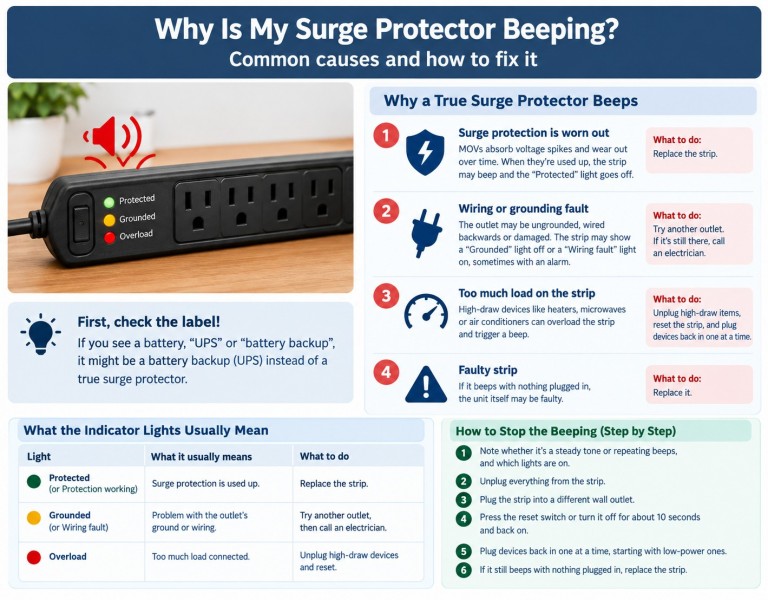
Most basic surge protectors don't beep at all. If yours does, it is usually one of two things: it's really a battery backup (UPS) sold with a "surge protector" label, or it's a surge protector that is warning you about a wiring fault, an overload or worn-out protection.
The quickest check is to look at the label. If you see a battery, "UPS" or "battery backup", jump to the first section below.
A true surge protector is a power strip with protection circuits and no battery. A battery backup (UPS) has a battery inside and beeps to report its status. Many people call both "surge protectors", and many battery backups include surge-protected outlets, so the mix-up is common.
You probably have a battery backup if:
If that matches, the beep is a status alarm. In general, beeping every 30 seconds or so means it is running on battery, fast beeping means the battery is low, a solid tone means overload, and a periodic alarm with a red light usually means the battery needs replacing. Patterns vary by brand and model, so see our full guide: APC battery backup beeping: what the beeps mean and how to fix it.
Most surge protectors report problems with indicator lights, not sound, and some cut power when their protection is gone. Some models do add an audible alarm. If yours beeps, these are the usual causes.
Surge protectors use components called MOVs that absorb voltage spikes. Every surge wears them down, and a big one can use up the protection at once. When that happens, the "Protected" light usually goes out, some units cut power, and some also sound an alarm.
What to do: If the protection light is off, replace the unit. It may still pass power to your devices, but it can no longer protect them from a surge.
Surge protectors need a properly grounded outlet. If the outlet is ungrounded, wired backwards or damaged, the strip may show a "Grounded" light that stays off or a "Wiring fault" light that comes on, sometimes with an alarm.
What to do: Plug the strip into a different outlet on a different circuit. If the fault light only appears at one outlet, have an electrician check that outlet. Don't ignore a wiring fault, because it can be a safety issue.
Heaters, microwaves, air conditioners and laser printers draw a lot of power. A strip loaded beyond its rating may trip its breaker, and some units also show an overload light or sound an alarm.
What to do: Unplug the high-draw items and plug them directly into a wall outlet. Reset the strip, then reconnect smaller devices one at a time. Never plug one power strip into another.
If the strip beeps with nothing plugged in, and it also beeps in a different outlet, the unit itself is faulty.
What to do: Replace it.
Safety note: If the strip feels hot, smells burnt or looks discoloured, unplug it immediately and don't use it again.
Names differ between brands, so check your manual.
| Light | What it usually means | What to do |
|---|---|---|
| "Protected" or "Protection working" is off | Surge protection is used up | Replace the strip |
| "Grounded" is off, or "Wiring fault" is on | Problem with the outlet's ground or wiring | Try another outlet, then call an electrician |
| "Overload" is on | Too much load connected | Unplug high-draw devices and reset |
Replace it if:
Don't silence an alarm and keep using it. The alarm means something is wrong. Unplugging the unit stops the noise but doesn't fix the cause.
No. Most use indicator lights only. Beeping usually means a battery backup, or a surge protector with an alarm for a fault.
Try a different outlet. If it still beeps, the unit is probably faulty. If it only beeps at one outlet, the outlet may have a wiring or grounding problem.
It is a UPS and is reporting its status: running on battery, low battery, overload or a battery that needs replacing. See our battery backup beeping guide.
The beep itself is not, but the cause may be. A hot or burnt-smelling strip should be unplugged at once, and a wiring fault should be checked by an electrician.
It is most likely an APC battery backup. Our APC beeping guide covers the patterns.
If your beeping unit turned out to be a battery backup with a failing battery, browse our UPS and battery categories.














Comments (0)
No comment