No products
To be determined Shipping
$0.00 Total

Blog Categories
Archives
Latest Posts


Is your APC surge protector beeping? Learn what different APC beep patterns mean, why your UPS is beeping, how to stop the alarm, and when you need to replace the battery or the entire unit.
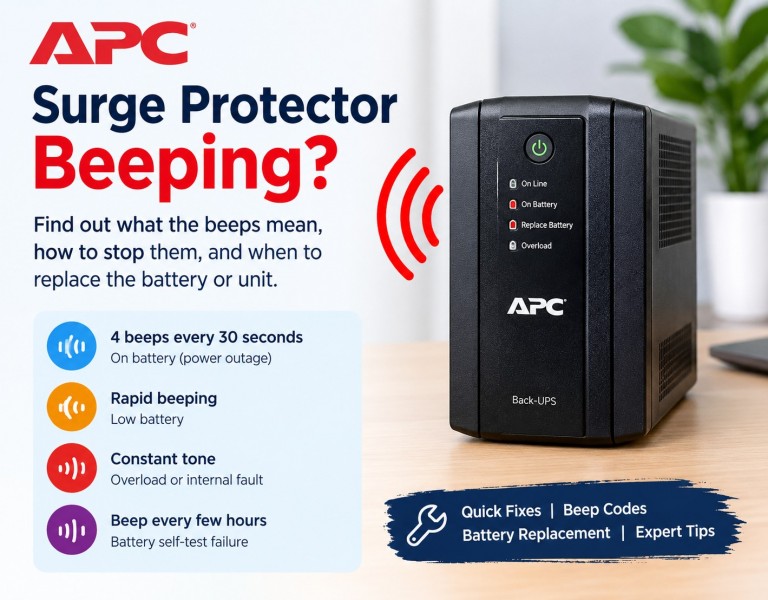
If your APC surge protector is beeping, the unit is almost certainly an APC UPS (uninterruptible power supply) with a battery inside, such as a Back-UPS or Smart-UPS. The beep is an audible alarm, and the pattern tells you what is wrong. Four beeps every 30 seconds means the UPS is on battery. Rapid beeping means low battery. A constant tone means overload. A beep for about a minute every few hours means the battery failed its self-test and needs to be replaced.
This guide helps you work out why your APC UPS is beeping, how to stop the beeping, and when it is time to replace the battery or the whole unit.
A basic surge protector, such as an APC SurgeArrest, has no battery and normally stays silent. It may have a "Protected" light and a "Grounded" light. If those lights go out, the protection is gone and the unit should be replaced.
Many people search for "apc surge protector beeping" because their battery backup surge protector is making noise. Strictly speaking, that product is a UPS. Check the label on the back or bottom of the unit. Names like Back-UPS, Back-UPS Pro, Back-UPS ES, Back-UPS BX, BE series, BR series or Smart-UPS confirm that you have a battery backup. Everything below applies to those units.
Beep patterns vary a little between models, so check your manual if yours does not match. These are the signals most Back-UPS owners hear:
| What you hear | What it usually means | What to do |
|---|---|---|
| Four beeps every 30 seconds | The UPS is in battery mode because of a power outage, brownout or bad input | Save your work and shut down, or wait for power to return |
| Rapid beeping, about every half second | Low battery, shutdown is close | Shut down connected devices now |
| One continuous tone | Overloaded UPS or an internal fault | Unplug devices and reset the unit |
| Beeping for about a minute, repeating every few hours, often with a red LED | Battery self-test failure, replace battery warning | Replace the UPS battery |
| Beeping with a site wiring fault light | Ground fault or bad outlet | Try another outlet or call an electrician |
Four beeps every 30 seconds means the UPS has switched to battery mode. Work through these checks in order:
If the beeping stops once the line voltage is stable, nothing is wrong with the unit.
Fast beeping means the battery is almost drained and the UPS is about to shut off. Shut down your computer, router, modem or NAS safely so you do not lose data. When power returns, let the UPS recharge. Recharging usually takes several hours.
If the runtime is much shorter than it used to be, the battery has probably reached the end of its life. See the battery replacement section below.
A solid, unbroken tone usually means the load is higher than the UPS can handle. It often starts after someone plugs a laser printer, a space heater or a second monitor into the battery outlets.
Keep laser printers and heaters off a UPS completely. They draw far more power than the unit is built for. Compare the total watts of your devices with the UPS wattage rating, not only the VA number. If your load is genuinely too big, you need a UPS with a higher load capacity.
If the constant tone continues with nothing plugged in, the UPS may have an internal fault. Replace the unit or have it serviced.
This is the most common reason for random beeping, and it explains many searches for "apc ups beeping with no power loss" and "apc ups beeping red light". The UPS runs an automatic self-test. When the battery fails, it sounds a replace battery warning every few hours and often shows a red or flashing indicator light.
UPS batteries are sealed lead-acid (SLA) batteries. They typically last about three to five years, and less in a hot room. Here is what to do:
After the swap, let the new battery charge for several hours and run another self-test. Some models also need you to calibrate the runtime or reset the replace battery alarm. Your manual explains how.
If your APC UPS keeps beeping after you install a new battery, check these points:
When the UPS beeps and will not power up, start with the basics. Confirm the wall outlet works by plugging in a lamp. Check the breaker and the power cord. Then press and hold the power button for a few seconds.
If it still beeps and stays off, the battery may be completely dead or disconnected. A fully drained or failed battery can stop the UPS from starting. Replace the battery. If a new battery does not help, the UPS has an internal fault and should be replaced.
If your APC UPS beeps only when your computer is on, the cause is usually load. A gaming PC with a powerful graphics card can pull far more power under load than it does at idle, which triggers an overload alarm. It can also drain an aging battery faster. Check the load percentage on the display or in PowerChute, and compare the wattage of your PC and monitor to the UPS rating.
A Smart-UPS usually shows an LCD display with a status code or error code, which makes diagnosis easier. Read the message on the screen, then match it to your manual. Common messages point to a replace battery warning, an overload, a high temperature or a fan fault. Update the firmware if one is available, and note the code before you call support.
Silencing the alarm is fine for a short time. Do not mute it and forget about it, because it is warning you about a real condition.
A new battery is usually the cheaper fix. Replace the entire unit if:
It is most likely a UPS, and the beep is an alarm. The cause is usually battery mode, low battery, overload or a failed battery self-test.
The most common cause is a battery that failed its self-test. The UPS tests itself on a schedule, and a weak battery triggers the alarm even when power is fine.
That device probably pushes the load past what the UPS can handle. Unplug it and try again, or move it to a surge-only outlet.
Fix the cause first. Then press the mute button, reset the unit or use PowerChute to turn off the alarm.
It means the UPS wants your attention. It may be running on battery, low on battery, overloaded, or asking for a new battery.
Most last three to five years. Heat shortens that.
Signs include a replace battery warning, a red light, a very short runtime, and a failed self-test.
Yes. Use the mute button, the power button or PowerChute, but fix the cause as soon as you can.
The beep itself is harmless. The condition behind it, such as a dead battery, means your equipment may not be protected during an outage. A hot, swollen or burnt-smelling UPS is dangerous and should be unplugged.
Rarely. If a surge-only unit makes noise or shows a fault light, it may be failing and should be replaced.
If your APC UPS is beeping because the battery has reached the end of its life, the fastest fix is a compatible replacement. Find the model number on the label, match it to the right battery, and your UPS can be protecting your equipment again within minutes.














Comments (0)
No comment