No products
To be determined Shipping
$0.00 Total











Do you have a list of products you are looking to source?
Send us the whole list and get Special discounted prices

 View larger
UMR
New
In Stock
Warning: Last items in stock!
Availability date:
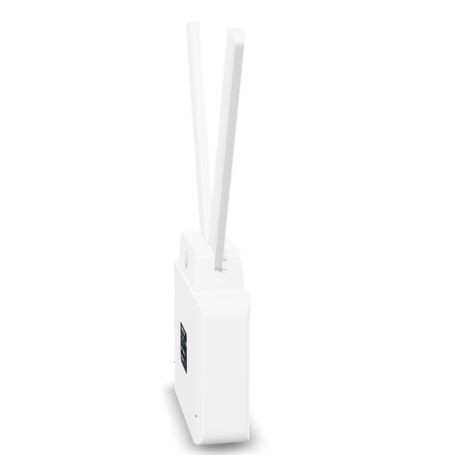
The Ubiquiti UMR UniFi Mobile Router provides mobile internet connectivity through LTE cellular service or a wired Ethernet WAN connection. Designed for flexible network deployments, it combines wireless access, wired Ethernet connectivity and routing features in a standalone device that does not require adoption by a UniFi Console.
The router is suitable for locations that need a primary cellular internet connection, temporary network access or a mobile connectivity solution. An active nano-SIM and compatible cellular service are required for LTE connectivity.
The UMR includes two Gigabit Ethernet ports for connecting the router to wired network equipment. One port can connect to an external Ethernet WAN source, while the LAN interface provides connectivity for local devices.
Its integrated Wi-Fi 4 radio provides 2.4 GHz wireless connectivity. The cellular modem supports LTE Cat 4, allowing the router to use a compatible mobile data service when configured for cellular access.
The device also supports PoE input and PoE output. PoE passthrough requires a suitable PoE+ input, and the connected equipment must remain within the supported power budget.
The UMR supports several network operating modes, including standard router mode, LTE passthrough mode and Ethernet bridge mode. Router mode provides conventional routing functionality, LTE passthrough can assign the carrier-provided public IP address to a single designated device when supported by the mobile provider, and Ethernet bridge mode disables LTE and routing functionality.
Management is available through the local interface over Wi-Fi or Ethernet. An optional Mobility Cloud subscription enables remote administration and additional centralized management features. A UniFi Console is not required for standalone operation.
The UMR can provide internet access at temporary work locations, small remote facilities, mobile installations and sites where cellular connectivity is preferred over a fixed broadband connection. Its Ethernet WAN interface also allows it to use an external wired internet source.
For supported deployments, the router can provide cellular connectivity to network equipment or operate in a configured bridge or passthrough mode. The appropriate mode depends on the required IP addressing, routing and cellular connectivity behavior.
For LTE operation, use a nano-SIM with an active data plan and confirm that the mobile carrier supports the router's cellular bands. Alternatively, connect an Ethernet internet source to the WAN port.
The router can be powered through its supported PoE input or USB-C power connection. If PoE output is required, use a compatible PoE+ input and check the power requirements of the connected device.
Local management is available without a cloud subscription. Remote access and certain centralized features require Mobility Cloud. Cellular performance and availability depend on carrier coverage, supported frequency bands, signal conditions and the selected data plan.
Before selecting the UMR, confirm cellular-band compatibility with the intended mobile carrier and determine whether the router will use LTE or wired Ethernet as its primary internet source. If you plan to power another device through PoE, verify the required PoE input and available power budget rather than assuming that any connected PoE source will support passthrough.
| Brand | Ubiquiti |
|---|---|
| Part Number / MPN | UMR |
| Product Type | LTE mobile router |
| Product Family | UniFi Mobile Router |
| Cellular Technology | LTE Cat 4 |
| SIM Type | Nano-SIM |
| Wi-Fi Standard | Wi-Fi 4 (802.11n) |
| Wi-Fi Frequency | 2.4 GHz |
| Ethernet Interfaces | 2 × Gigabit Ethernet |
| WAN Connectivity | Ethernet WAN or LTE cellular |
| PoE Support | PoE input and PoE output |
| PoE Passthrough Requirement | PoE+ input required |
| Alternative Power Input | USB-C |
| Operating Modes | Router, LTE passthrough and Ethernet bridge |
| Local Management | Supported through Wi-Fi or Ethernet |
| Remote Management | Optional Mobility Cloud subscription |
| UniFi Console Requirement | Not required |
| Cellular Service | Compatible SIM and active data plan required |
No. The router operates as a standalone device and can be configured locally. Optional Mobility Cloud provides remote management and additional centralized features.
Yes. The Ethernet WAN interface allows the router to connect to an external wired internet source.
Do not assume that a cellular data plan is included. Standard LTE operation requires a compatible SIM and active service, unless the specific regional package explicitly includes a plan.
The router supports PoE output. PoE passthrough requires PoE+ input, and compatibility depends on the connected device's power requirements and the available power budget.
LTE passthrough mode can assign the carrier-provided public IP address to one designated device when the mobile carrier provides a publicly routable address. Carrier network configurations such as CGNAT may prevent direct public-IP access.
Local management is available without a cloud subscription. Remote management through Mobility Cloud requires the applicable subscription after any eligible trial period.
All packages are shipped same day if the order is placed before 3PM CST
We use UPS/FedEx to ship the packages with different service levels offered by UPS/FedEx
Overnight Shipping take 1 business day
Expedited Shipping take about 2-3 business days
Ground shipping take about 3-5 business days
You can select the desired service level at Checkout and we will make sure the package is shipped as per the selected service level.
We Accept
i) PayPal
ii) All Credit & Debit Cards
iii) Purchase Orders
iv) Check
v) Bank Transfer/ACH/Wire Transfer
To process the order through Paypal/CC, you can simply checkout and process the payment.
If you want to issue us Purchase Order/Check/Bank Transfer, Please contact us at the following details
Call: 469.458.9636
Email: sales@dcsupplies.net
If you have any queries, please contact us at the following details and we will be happy to help
Call
469.458.9636
469.458.9638
Email
sales@dcsupplies.net



