No products
To be determined Shipping
$0.00 Total











Do you have a list of products you are looking to source?
Send us the whole list and get Special discounted prices


 View larger
U-LTE-BACKUP PRO
New
In Stock
Warning: Last items in stock!
Availability date:
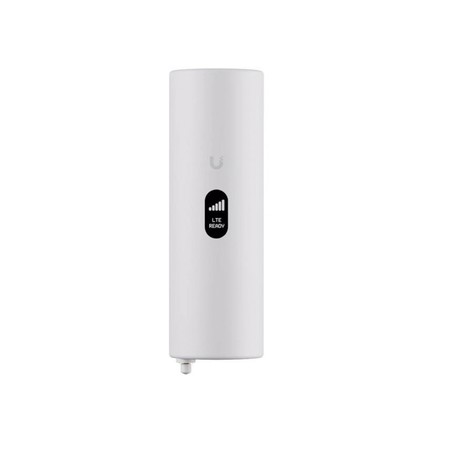
The Ubiquiti U-LTE-Backup Pro is a UniFi LTE Backup device designed to provide cellular internet connectivity and failover for compatible UniFi gateways. It uses an LTE Category 4 radio and a nano-SIM for cellular data, allowing LTE connectivity to be used as a backup WAN connection or as a cellular internet connection within a supported UniFi deployment.
The US version of the U-LTE-Backup Pro operates on the AT&T network and uses LTE Bands 2, 4, 5, 12, 14, and 66. A data-only nano-SIM is required for cellular operation.
The integrated LTE Category 4 radio uses 2 x 2 MIMO and is specified for theoretical maximum throughput of up to 150 Mbps download and 50 Mbps upload. Actual cellular performance depends on location, network conditions, signal strength, and carrier performance.
Two internal LTE antennas are built into the device. An additional female RP-SMA connector is provided for an optional external LTE antenna. Ubiquiti specifies that the maximum antenna gain must not exceed 6 dBi to comply with applicable regulations.
The U-LTE-Backup Pro provides two Gigabit Ethernet RJ45 interfaces. One interface provides PoE input, while the second provides PoE passthrough output. The PoE passthrough function requires the device to receive power from a PoE+ switch.
The device can be integrated with compatible UniFi gateways for internet failover. Ubiquiti also supports LAN-connected backup deployments, allowing the LTE device to be positioned where cellular reception is suitable while the backup connection is carried through the network.
The U-LTE-Backup Pro supports a 44–57V DC input range and can be powered from a UniFi PoE switch or a 48V, 0.5A PoE adapter. Maximum power consumption is 8.5W when PoE passthrough output power is excluded.
The PoE passthrough output can provide up to 15.4W per port when the U-LTE-Backup Pro is powered from a PoE+ switch. PoE passthrough should therefore be planned around both the upstream switch's available PoE budget and the requirements of the connected device.
The device is managed through Ethernet and integrates with UniFi Network. Ubiquiti specifies UniFi Network version 7.2.85 or later for management. A 1.54-inch display provides local device status information, while a dedicated button is provided for factory reset.
The U-LTE-Backup Pro is designed for UniFi networks that require a cellular backup connection when a primary internet service becomes unavailable. It can also provide LTE connectivity where cellular service is being used as a primary or secondary internet path in a supported UniFi deployment.
Its external antenna connection can be useful when the device needs to be positioned for network connectivity while an external antenna is required to address the available cellular signal conditions.
For installations using PoE passthrough, the upstream power source is important: Ubiquiti requires a PoE+ switch for the passthrough output and specifies a maximum passthrough wattage of 15.4W. The cellular connection also requires a data-only nano-SIM, and the US model is specified for the AT&T network. Confirm carrier and SIM requirements before deployment.
| Specification | Details |
|---|---|
| Brand | Ubiquiti |
| Part Number / MPN | U-LTE-Backup Pro |
| Product Type | LTE Backup Gateway |
| Product Family | UniFi |
| Networking Interfaces | 2 x Gigabit Ethernet RJ45 |
| Cellular Technology | LTE Category 4 |
| LTE MIMO | 2 x 2 |
| LTE Download Speed | Up to 150 Mbps |
| LTE Upload Speed | Up to 50 Mbps |
| SIM | Nano-SIM, data-only |
| US Cellular Operator | AT&T network |
| LTE Bands | B2, B4, B5, B12, B14, B66 |
| Internal LTE Antennas | 2 |
| External Antenna Connector | 1 x female RP-SMA |
| Maximum External Antenna Gain | 6 dBi |
| PoE Input | 1 x PoE in |
| PoE Passthrough | 1 x PoE passthrough output |
| PoE Passthrough Requirement | PoE+ switch required |
| Maximum PoE Passthrough | 15.4W per port |
| Supported Voltage Range | 44–57V DC |
| Power Supply Options | UniFi PoE switch; 48V, 0.5A PoE adapter |
| Maximum Power Consumption | 8.5W, excluding PoE passthrough output |
| Management Interface | Ethernet |
| Management Software | UniFi Network 7.2.85 or later |
| Display | 1.54-inch LCM screen |
| Reset | Factory-reset button |
| Mounting | Wall mount or foot stand |
| Enclosure Material | Polycarbonate |
| Dimensions | 66 x 202 x 32 mm (2.6 x 7.95 x 1.26 in) |
| Weight Without Stand | 223 g (7.86 oz) |
| Weight With Stand | 336 g (11.85 oz) |
| Operating Temperature | -10°C to 60°C (-14°F to 140°F) |
| Operating Humidity | 5% to 95% non-condensing |
| Certifications | FCC, IC |
| NDAA Compliant | Yes |
The U-LTE-Backup Pro provides LTE cellular connectivity for compatible UniFi networks and can be used as a backup internet connection for supported UniFi gateways.
The US version uses a data-only nano-SIM. Ubiquiti specifies the US model for operation on the AT&T network.
The LTE Category 4 radio is specified for up to 150 Mbps download and 50 Mbps upload. Actual speeds depend on cellular coverage and network performance.
Yes. It provides one PoE passthrough output capable of up to 15.4W per port when the device is powered from a PoE+ switch.
Yes. The device includes one female RP-SMA connector for an optional external antenna. Ubiquiti specifies a maximum antenna gain of 6 dBi.
Yes. Ubiquiti specifies wall mounting and a foot stand as the included mounting options.
All packages are shipped same day if the order is placed before 3PM CST
We use UPS/FedEx to ship the packages with different service levels offered by UPS/FedEx
Overnight Shipping take 1 business day
Expedited Shipping take about 2-3 business days
Ground shipping take about 3-5 business days
You can select the desired service level at Checkout and we will make sure the package is shipped as per the selected service level.
We Accept
i) PayPal
ii) All Credit & Debit Cards
iii) Purchase Orders
iv) Check
v) Bank Transfer/ACH/Wire Transfer
To process the order through Paypal/CC, you can simply checkout and process the payment.
If you want to issue us Purchase Order/Check/Bank Transfer, Please contact us at the following details
Call: 469.458.9636
Email: sales@dcsupplies.net
If you have any queries, please contact us at the following details and we will be happy to help
Call
469.458.9636
469.458.9638
Email
sales@dcsupplies.net



