No products
To be determined Shipping
$0.00 Total











Do you have a list of products you are looking to source?
Send us the whole list and get Special discounted prices


 View larger
DELL-WD22TB4
New
In Stock
Warning: Last items in stock!
Availability date:
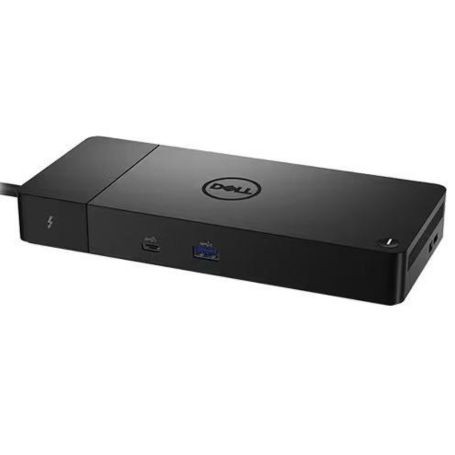
The Dell WD22TB4 is a Thunderbolt 4 docking station designed to expand connectivity for compatible laptops in professional, office and home workstation environments. It combines external display outputs, USB peripheral connections, wired networking and laptop power delivery in one docking solution. With an included 180W power adapter, the dock delivers up to 130W to compatible Dell systems and up to 90W to compatible non-Dell systems.
The WD22TB4 helps simplify desk setups by consolidating display, networking and peripheral connections through a single host cable. Connect compatible monitors, keyboards, mice, external storage and wired networking without plugging every accessory directly into the laptop.
Thunderbolt 4 supports high-bandwidth connectivity for compatible computers and peripherals. The dock can support up to four external displays, depending on the host computer, graphics capabilities, connection type and display configuration. Compatible Thunderbolt systems may support resolutions up to 5K at 60Hz, while suitable HBR3 systems with Display Stream Compression can support up to 8K at 60Hz under supported configurations.
| Brand | Dell |
|---|---|
| Model | WD22TB4 |
| Product Code | DELL-WD22TB4 |
| Product Type | Thunderbolt 4 docking station |
| Docking Interface | Thunderbolt 4 via USB-C connector |
| Attached Cable Length | 0.8 metres |
| DisplayPort Outputs | 2 × DisplayPort 1.4 |
| HDMI Output | 1 × HDMI 2.0 |
| USB-C Display Output | 1 × USB 3.2 Gen 2 Type-C with DisplayPort 1.4 Alt Mode |
| Thunderbolt Ports | 2 × Thunderbolt 4 USB-C ports |
| USB-A Ports | 3 × USB 3.2 Gen 1, including 1 with PowerShare |
| Additional USB-C Port | 1 × USB 3.2 Gen 2 Type-C |
| Network Interface | 1 × Gigabit Ethernet (RJ-45) |
| External Displays | Up to 4, depending on host capabilities and display configuration |
| Maximum Display Resolution | Up to 5K at 60Hz with compatible Thunderbolt systems; up to 8K at 60Hz with supported HBR3 and DSC configurations |
| Included Power Adapter | 180W AC adapter |
| Power Delivery to Dell Systems | Up to 130W with compatible systems |
| Power Delivery to Non-Dell Systems | Up to 90W with compatible systems |
| Dimensions | 205 × 90 × 29 mm |
| Security Slots | Kensington lock slot and Noble Wedge lock slot |
| Colour | Black |
The WD22TB4 supports a range of monitor configurations, including multiple Full HD or QHD displays and compatible 4K displays. With supported Thunderbolt systems, the dock can drive up to two 4K displays at 60Hz. Systems with suitable HBR3 bandwidth and Display Stream Compression may support more demanding configurations, including up to four 4K displays at 60Hz under supported conditions.
Maximum resolution, refresh rate and the number of active displays depend on the connected computer's graphics hardware, Thunderbolt or DisplayPort capabilities, operating system and monitor connections. Check the host computer specifications before planning a multi-monitor workstation.
The dock is designed for compatible Thunderbolt systems and USB-C computers that support DisplayPort Alt Mode. Some functions and display configurations require a Thunderbolt connection, so a standard USB-C port may not provide the same capabilities.
Charging power also depends on the connected computer. The included 180W adapter enables up to 130W power delivery to compatible Dell systems and up to 90W to compatible non-Dell systems. Laptops requiring more power may need their own power adapter for full performance.
With its included 180W adapter, the dock provides up to 130W to compatible Dell systems and up to 90W to compatible non-Dell systems.
The dock includes two DisplayPort 1.4 outputs, one HDMI 2.0 output, one USB-C DisplayPort output and two Thunderbolt 4 USB-C ports.
Yes, it supports up to four external displays in compatible configurations. The actual number of displays and supported resolutions depend on the computer's graphics and connection capabilities.
It can work with compatible USB-C systems that support DisplayPort Alt Mode, but Thunderbolt-specific features and maximum display configurations may require a Thunderbolt-compatible host.
Yes. It includes a Gigabit Ethernet RJ-45 port for compatible wired network connections.
The standard package includes the Dell WD22TB4 docking station with its attached Thunderbolt cable, a 180W power adapter and documentation. Confirm package contents with the seller for the specific stock item.
Before ordering, check that your computer supports Thunderbolt 4 or the required USB-C DisplayPort features, and verify its charging requirements. The WD22TB4's maximum display capabilities depend on the host system and the monitors connected. For official specifications, compatibility details and setup instructions, refer to the and the
All packages are shipped same day if the order is placed before 3PM CST
We use UPS/FedEx to ship the packages with different service levels offered by UPS/FedEx
Overnight Shipping take 1 business day
Expedited Shipping take about 2-3 business days
Ground shipping take about 3-5 business days
You can select the desired service level at Checkout and we will make sure the package is shipped as per the selected service level.
We Accept
i) PayPal
ii) All Credit & Debit Cards
iii) Purchase Orders
iv) Check
v) Bank Transfer/ACH/Wire Transfer
To process the order through Paypal/CC, you can simply checkout and process the payment.
If you want to issue us Purchase Order/Check/Bank Transfer, Please contact us at the following details
Call: 469.458.9636
Email: sales@dcsupplies.net
If you have any queries, please contact us at the following details and we will be happy to help
Call
469.458.9636
469.458.9638
Email
sales@dcsupplies.net